← Paid: Invoice & Estimate Maker
A plumber invoice app that costs $14.99 once
Plumbing invoices have their own shape. There's a call-out fee, a line for parts, a line for labor, sometimes a deposit already collected, and tax at the bottom. Most invoice apps let you do all of this, but they charge $10 to $20 a month for the privilege. You're paying a subscription to make a PDF.
Paid is an invoice and estimate app for iPhone and iPad. It costs $14.99 once, with no subscription and no monthly fee. Your first 6 documents are free with every feature. This page walks through what a plumber's invoice needs and how to set it up in Paid.
What a plumber's invoice needs
A plumber's invoice has six things that a generic "hours worked" invoice doesn't. Here's how each one works in Paid.
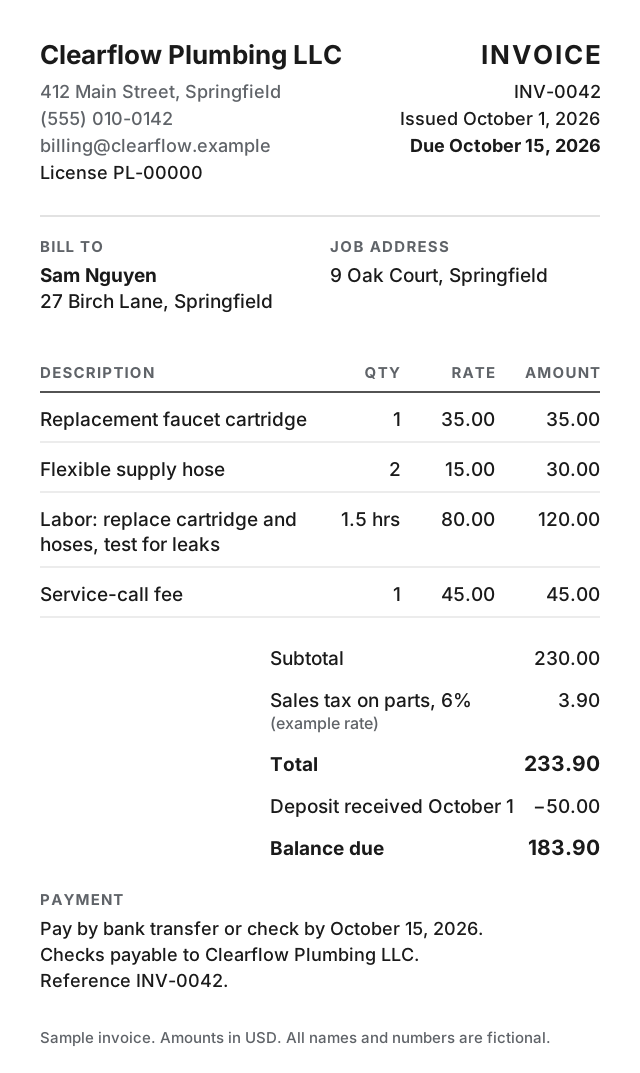
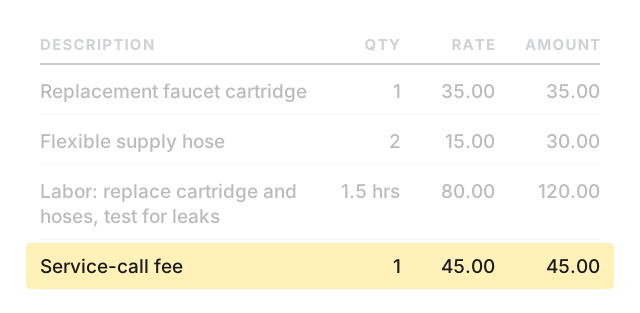
Here's what a typical faucet repair invoice looks like as line items in Paid.
| Item | Quantity | Price | Total |
|---|---|---|---|
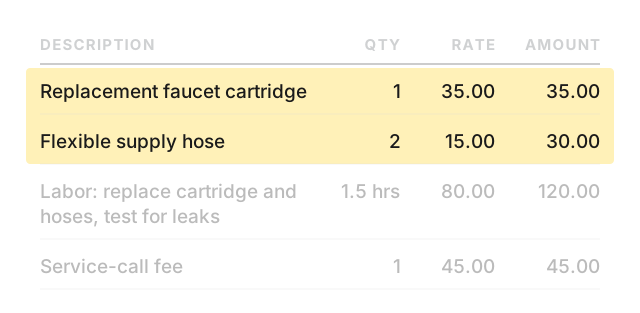
| Replacement faucet cartridge | 1 | $35.00 | $35.00 |
| Flexible supply hose | 2 | $15.00 | $30.00 |
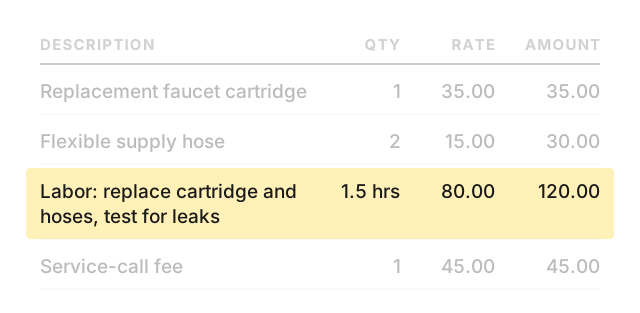
| Labor: replace cartridge and hoses, test for leaks | 1.5 hours | $80.00 | $120.00 |
| Call-out fee | 1 | $45.00 | $45.00 |
Sample prices, before tax.
- Call-out fee. Add it as a line item with quantity 1 and the flat rate as the price. It shows on the PDF as its own line, separate from labor.
- Parts and labor, listed separately. Each part gets its own line item with a quantity and unit price. Labor gets a separate line, either as a flat rate (quantity 1) or by the hour (quantity = hours worked, price = hourly rate). The customer sees exactly what they're paying for.
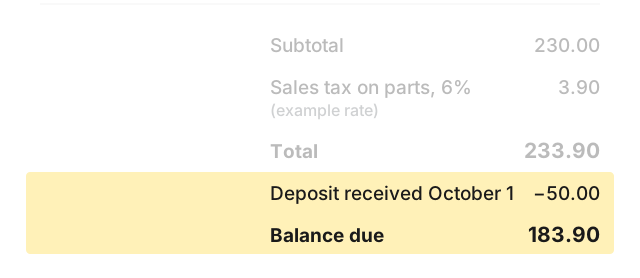
- Deposit already received. If the customer paid a deposit before the work, enter it as a discount using a dollar amount. The PDF prints a Discount row that reduces the total. Add a note on the invoice that the discount is the deposit the customer already paid, so it reads as money collected, not a price cut.
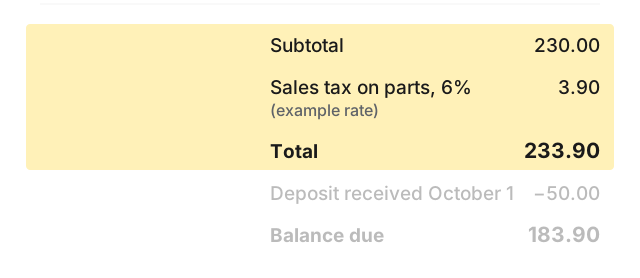
- Tax lines. Paid lets you set up to 5 named tax lines. If your state charges sales tax on parts, add a tax line for it. If you have both state and local tax, or GST and PST, add a separate line for each one. Every tax line shows up on the PDF by name so your customer can see exactly what's being charged.
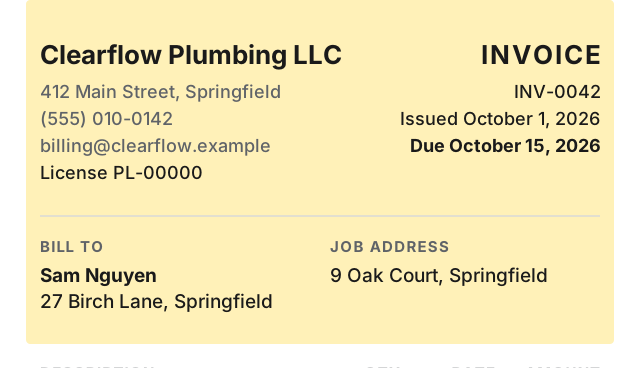
- License or tax registration number. Paid has a tax registration number field in the header, and it works for a plumbing license number too. Put whichever number you need to show in that field. It prints near the top of every invoice.
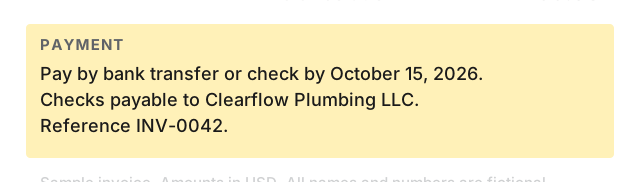
- The due date. Every invoice in Paid has a due date field, and the PDF prints it near the top with the label "Due." Pick a real date the customer can see so there's no confusion about when payment is expected. The same field prints as "Valid until" on an estimate.
How a plumbing job becomes an invoice
You're at the customer's house. They describe the problem, you look at the pipes, and you know what it'll cost. Open Paid on your phone and write an estimate. List the call-out fee, the parts you expect to use, and the labor. Add your tax lines. Send the estimate to the customer by text or email before you leave the driveway.
The customer says yes. You do the work. When you're done, open the estimate in Paid and convert it to an invoice in one tap. Adjust the parts if you used something different, update the labor hours, and send the invoice. Done.
If you work with the same customers, save them. The next time you write an estimate for that address, their name and details fill in automatically. Same for line items you use often: save "Copper pipe 3/4 in" with its price once, and it's there every time.
A basement mechanical room or a house in a dead zone shouldn't stop you from writing the invoice. Paid works offline on iPhone and iPad. Enter the parts and labor while you're still on site, and send the PDF by text or email once you have a signal.
The PDF your customer gets
The invoice comes out as a clean PDF on US Letter paper. It shows your business name, logo, phone number, and the tax registration or license number at the top. Below that: the customer's name and address, the invoice number, the date, and the due date.
The body lists every line item with its quantity, unit price, and line total. Then the subtotal, any discount or deposit, each tax line by name, and the total due. Your payment instructions print at the bottom, whether that's a bank account number, Venmo handle, or a note that says "check payable to."
You send the PDF straight from your phone. Text it, email it, or share it through any app on your phone. No login, no portal, no printing.
Try it free for your first 6 plumbing invoices. Every feature, no time limit.
Get Paid on the App StoreWhat you give up
Paid runs on your phone and costs $14.99 once. That means some things are left out. Be clear about whether you need them:
- No online payment links. Paid prints your payment details on the invoice. Your customer pays you directly by bank transfer, Venmo, check, or cash. If you need a link where customers can pay with a credit card, you need a different app.
- No cloud or web version. Your invoices live on your phone. You can't open them on a laptop or share login access with someone else.
- No recurring invoices. Every invoice is created one at a time.
- No expense tracking or time tracking.
If you bill one job at a time, send a PDF, and get paid by transfer or check, you don't need any of that. You need an app that makes the invoice and gets out of the way.
Price
Your first 6 documents are free. Every feature works, no time limit. After 6 documents, one purchase of $14.99 removes the limit forever. No subscription. No monthly fee. No annual renewal.
Even the cheapest subscription invoice app costs more than $14.99 after two months.
About Paid
The app behind this page.
Paid is an invoice and estimate app for iPhone and iPad. Write an estimate on site, turn it into an invoice when the job is done, and send a clean PDF from your phone. Free for your first 6 documents with every feature. $14.99 once for unlimited use.